


Thrift Savings Plan
4.81.92K Reviews
App Specs
- Version
- 7.2.0
- Updated On
- License
- Free
- Downloads
- 500,000+
- Developer
- FRTIB
- Categories
- Business
- Platform
- Android, iOS
Screenshots

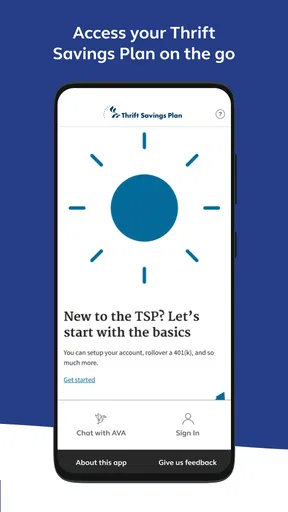
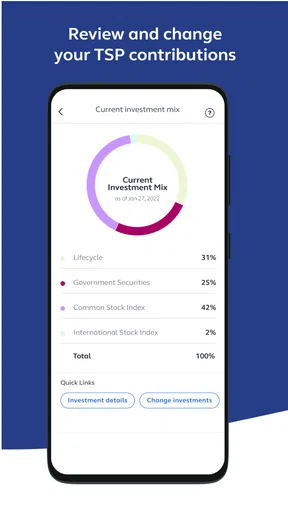

 Analysis by AppCompare
Managing a retirement account is rarely difficult because of one dramatic task. The trouble usually comes from small interruptions: remembering where to sign in, checking whether a contribution changed, finding the right balance before a financial decision, or moving from a desktop browser to a phone while away from home. Thrift Savings Plan is designed for that particular routine. It is a free business app from FRTIB that brings TSP account access and management into a mobile setting, and I found its value is greatest when I treat it as a practical checkpoint rather than something I open casually.
After using it, my overall impression is positive. The app feels focused on one job: helping TSP participants keep track of their retirement plan without needing a computer for every visit. It is not a general budgeting tool, an investment education platform, or a replacement for broader financial planning. That narrow purpose is also its strength. If your main need is to review your TSP position, make an account-related decision, or confirm that an action has gone through, this is much more direct than juggling browser tabs and saved bookmarks.
From a quick account check to a completed TSP decision
When I move from a quick account check toward a real TSP decision, I try to keep the two steps separate: first confirm what the account shows, then decide whether action is needed. That pause is especially useful when a household budget or conversation with someone else is part of the picture. Next, I consider how to keep account access personal while still coordinating the broader decision.
The starting condition: needing a reliable view of your retirement plan
A realistic use case starts with a simple question. I might be preparing a monthly budget and want to know whether a recent payroll change is reflected in my retirement account. Alternatively, I could be reviewing my overall finances before increasing savings, changing an allocation, or discussing retirement planning with someone I trust. In each case, I do not need a stock-market news feed or a full household finance dashboard. I need a clear route into my TSP account.
That distinction matters because many people approach financial apps expecting them to gather every account in one place. This one is different. Its purpose is tied specifically to the Thrift Savings Plan, so it makes sense for federal employees, service members, and other TSP participants who want a dedicated mobile path. Someone without a TSP account will find little reason to install it, and a person looking for automatic tracking across bank accounts, credit cards, loans, and outside investments would be better served by a broader personal-finance app.
The app is rated for Everyone, which makes the presentation approachable for a wide range of users, but that should not be confused with financial simplicity. Retirement decisions can have long-term consequences. I would use the app to access information and carry out an intended task, while taking more time before changing a contribution or investment choice. The mobile format makes access easier; it does not remove the need to understand what I am changing.
Opening the app and getting oriented
The first useful habit is to open the app with a specific purpose. Instead of tapping through every screen, I decide whether I am checking an account figure, reviewing activity, or handling an account-management task. That small change keeps the session efficient and reduces the chance of making a hurried decision simply because the relevant option is visible.
Worth Reading Before You Choose

EA SPORTS FC Mobile 26 Is a Bigger Football Game, but It Takes Time

Flipboard Shows What News Apps Must Do Beyond the Feed

Switching to Android Auto Means Rethinking Your Driving Routine

Google Calendar Makes a Crowded Week Easier to Manage

Ludo King Makes the Most of the Minutes Between Plans

Baby Panda World Brings Quick Play to Modern Phones, but Its Game Library Feels Busy
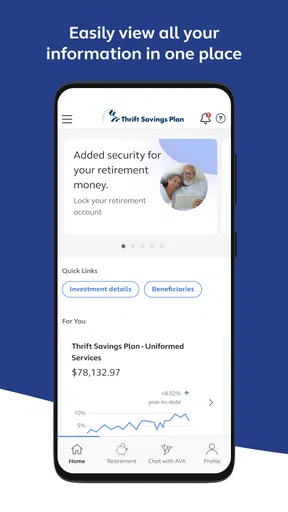
Once inside, I expect the most important information to be organized around the TSP account rather than around unrelated financial products. That focus is more comfortable than a crowded financial dashboard when I only need to answer one TSP question. It also makes the app easier to recommend to someone who is comfortable with their retirement plan but does not want to learn a complicated investing platform.
There is a practical trade-off here. A dedicated app can be easier to navigate because it has fewer competing purposes, but it cannot give me the complete context that a financial-planning service might provide. Before acting, I may still need a separate budget, a benefits document, a pay statement, or advice from a qualified professional. The app is the account doorway, not the entire decision-making process.
Following the task instead of browsing aimlessly
My preferred workflow is to check the current account view first, identify the exact action I need, and then pause before confirming anything consequential. That order is useful because it separates observation from action. I can see where things stand, compare that with my expectation, and only then decide whether I need to proceed.
For example, imagine I changed my payroll contribution through an employer or service-related process and want to see whether the change appears in TSP. The app becomes the final checkpoint in a chain that begins outside the app. I would sign in, inspect the account information, and compare it with the amount or timing I expected. If it looks right, I have a quick confirmation. If it does not, I know the next conversation belongs with the relevant payroll or TSP support channel rather than with guesswork inside the app.
This is one of the less obvious strengths of a dedicated account app: it can help separate system responsibilities. The app shows the TSP side of the process, while payroll systems and workplace procedures may control when a contribution is initiated. Understanding that handoff prevents a common mistake—assuming that a mobile display must update at the exact moment an outside change is submitted.
Handling the handoffs between phone, workplace, and planning tools
Retirement-account management almost always involves more than one place. A contribution decision may begin with a paycheck, a benefits portal, or a conversation with a supervisor or financial counselor. The TSP app sits in the middle of that workflow as the place where I can inspect the account and manage the TSP portion of the task.
That middle position is useful, but it also creates friction. If I am trying to understand why a figure has not changed, the app may show the account state without explaining every upstream payroll event. I need to keep the original request, pay information, and timing in mind. A screenshot or note of what I expected can make a later follow-up much clearer, especially when I am comparing a mobile account view with an employment record.
Another handoff occurs when I move from checking information to making a broader retirement decision. The app can be convenient for accessing the account, but a retirement plan involves goals, emergency savings, taxes, time horizon, and other assets. I would not use a quick phone session as a substitute for that wider review. Instead, I would use the app to obtain the TSP information needed for a more complete discussion or personal plan.
This is where it compares favorably with the usual alternative of using a mobile browser. A browser can work, particularly when I need a larger screen or several reference documents open at once, but a dedicated app feels more natural for repeat account checks. The alternative remains better when I am doing extensive research, comparing documents side by side, or working through a complicated financial review. The app wins for focused access; the browser can win for context.
Turning the account view into an outcome
A successful session ends with a clear outcome, not merely with the app being opened. That outcome might be confirming that my account information matches my records, identifying a task I need to complete, or deciding that I need to contact the appropriate support channel. I like this way of thinking because it keeps the app from becoming a source of nervous checking.
For a monthly routine, I would choose a consistent moment—perhaps after reviewing a pay statement—and use the app to verify the TSP side of my plan. I would note anything that needs follow-up, then close the app rather than repeatedly refreshing it. This workflow is more useful than checking whenever market headlines or financial anxiety appear, because it ties the account review to a real personal-finance process.
The result is modest but meaningful: less dependence on a computer for routine TSP access, a clearer view of the account during everyday planning, and a more organized way to notice when an outside process needs attention. The app does not make retirement planning automatic, but it can remove one layer of inconvenience between me and the information I need.
What the app is like as a long-term mobile tool
Thrift Savings Plan was released on May 20, 2022, and the current version is 7.2.0. It requires iOS or Android 12 or later, so compatibility is the first practical check before installation. On a supported device, the app is positioned as a current mobile access point rather than an old utility that I would keep only for occasional emergency use.
Its adoption also suggests that it has become familiar to a substantial TSP audience: the app has over 500 thousand installs, with an average rating of 4.8 from around 5.5 thousand ratings. I do not treat those figures as proof that every experience will be smooth, but they do make the app feel established enough to consider for regular account access. The price is another easy decision point: it is free, so the question is usefulness and compatibility rather than whether a subscription is worthwhile.
The developer is FRTIB, which is relevant because this is not a third-party app attempting to recreate a retirement account dashboard. That identity gives the app a clear relationship to the TSP service itself. I still pay attention to the sign-in and account-handling steps, as I would with any financial application, but the official focus is an important reason I would choose it over an unfamiliar tool claiming to track TSP information.
Small habits that make the workflow safer and clearer
My first tip is to use the app for verification before using it for change. If I am unsure whether a contribution or account detail is current, I look first and act second. This sounds obvious, but separating those steps is especially helpful on a small screen, where it is easy to move quickly through a task without reflecting on the effect.
My second tip is to record the question I am trying to answer. “Did my expected contribution appear?” is more useful than “I should check my retirement account.” A precise question tells me what to inspect and what evidence I need before I leave the app. It also makes a support conversation more productive if the account view does not match my records.
My third tip is to treat the app as one part of a handoff chain. When a change originates in payroll or a workplace benefits process, I keep that source in mind. The app can confirm the TSP-side result, but it may not be the place where the original change was created. This prevents me from repeating an action or assuming that a delay automatically means something went wrong.
A fourth useful habit is to use a larger-screen alternative when the task becomes analytical. If I am comparing retirement income goals, reviewing several documents, or discussing choices with another person, a browser or desktop session may be more comfortable. The phone app is best when the task is focused and the desired outcome is clear.
Where the flow breaks
The main limitation is not that the app has a narrow purpose; it is that users may expect that narrow purpose to cover more of their financial life. It will not replace a household budget, an investment research service, or a retirement-income calculator. If your goal is to see every account together or model several future scenarios, you will need another tool alongside it.
The workflow can also break when information arrives at different times across connected systems. A mobile account view may be accurate while still not matching a change I made elsewhere moments ago. In that situation, repeated checking does not solve the underlying handoff. I would compare the account with the relevant pay or benefits record, allow the normal process to progress, and seek help through the appropriate channel if the mismatch remains important.
Another point of friction is the difference between convenience and confidence. A phone makes it easy to access a retirement account while traveling or between tasks, but that convenience can encourage rushed decisions. I would avoid changing an important setting merely because I have a spare minute. The app is excellent for access and confirmation; it deserves more deliberate use when the outcome affects long-term savings.
People who should skip it are those without a TSP relationship, users whose devices do not meet the minimum operating-system requirement, and anyone seeking a single dashboard for all personal finances. A desktop browser may also be the better choice for users who prefer large-screen navigation or who regularly work with supporting documents. In those cases, installing the app may add another route without solving the main problem.
My recommendation after following the complete workflow
I recommend Thrift Savings Plan to TSP participants who want a straightforward mobile way to check and manage their account. In my experience, its best role is as a dependable link between a real-world financial task and a confirmed account result: a contribution review, a routine balance check, or a follow-up after a workplace change. It is free, focused, and supported by FRTIB, with an Everyone rating that makes it approachable for general use.
I would not present it as a complete retirement solution. Its usefulness depends on knowing what you want to verify, understanding which organization controls each step, and recognizing when a wider planning tool is necessary. Used that way, Thrift Savings Plan is most valuable as a focused account-management companion, not as a replacement for financial judgment.
For me, the deciding question is simple: do I need convenient access to a TSP account on a supported phone? If the answer is yes, this app earns a place in my routine. It reduces the friction of checking the account, clarifies the final stage of several workplace-related workflows, and helps me finish with an answer instead of another open browser tab. If I need broader analysis, I would pair it with other resources rather than asking it to become something it was not designed to be.
Pros
- Official access to federal employees’ retirement savings accounts.
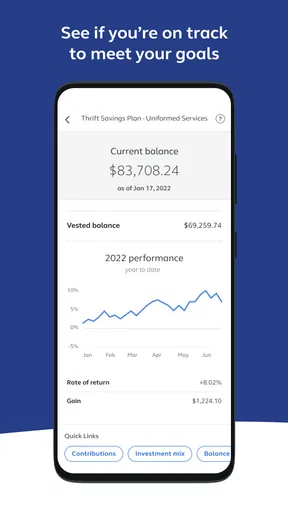
- Clear view of balances
- contributions
- and investment allocations.
- Supports account management while traveling or away from a computer.
- Provides educational resources for retirement planning decisions.
- Secure login options help protect sensitive financial information.
Cons
- Some features may redirect users to the TSP website.
- Requires an active TSP account to use most functions.
- Investment choices are limited compared with many private brokerages.
- Market data and account updates may not appear instantly.
- Interface can feel basic for users seeking advanced planning tools.
FAQs for Thrift Savings Plan
What is the Thrift Savings Plan app used for?
The Thrift Savings Plan app is designed to help eligible federal employees and members of the uniformed services keep track of their TSP retirement savings. After signing in, users can typically review account balances, monitor investment allocations, check contributions, view transaction information, and access important plan resources without needing to use a desktop browser.
Who can use the Thrift Savings Plan app?
Access is generally intended for participants in the federal government’s Thrift Savings Plan, including eligible civilian federal employees and members of the uniformed services. You normally need an existing TSP account and valid login credentials. The app is not a general investment platform for opening unrelated brokerage accounts, so eligibility should be confirmed through the official TSP website or your agency.
Is the Thrift Savings Plan app safe to use?
The official app should use account authentication and security protections intended to safeguard sensitive retirement information. However, users should download it only from the official Google Play Store or Apple App Store, verify the developer name, and avoid unofficial APK files or suspicious links. Never share passwords, one-time codes, or security answers with anyone claiming to provide support.
Can I change my contributions or investments through the app?
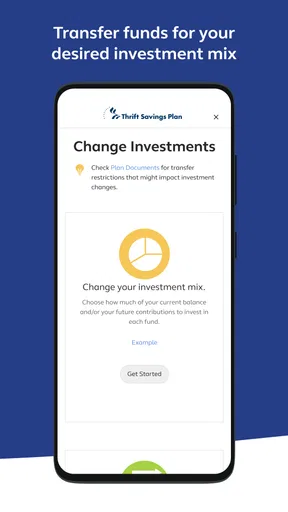
The available account-management options may depend on the current version of the app and your account status. TSP participants may be able to review contribution details, investment allocations, or other account settings, while some changes may require additional verification or the official website. Before submitting a transaction, carefully review the fund selection, contribution percentage, and effective date.
Does the Thrift Savings Plan app provide financial advice?
The app primarily provides access to your TSP account information, plan tools, educational materials, and transaction features; it should not be treated as personalized financial advice. Retirement decisions can depend on your income, age, risk tolerance, service status, and other savings. Review official TSP information and consider consulting a qualified financial professional before making significant investment changes.


